A fresh look at Startup Management in Reg Organizer
2026-07-09 by Chemtable Software
We rarely share what’s under development, but this is one of those cases where we just want to give you a glimpse of what we’ve been working on lately and show you our progress. Yes, the work on the new interface for the Startup Applications tool in Reg Organizer isn’t finished yet, but the results are already so exciting that we couldn’t resist lifting the curtain a little.
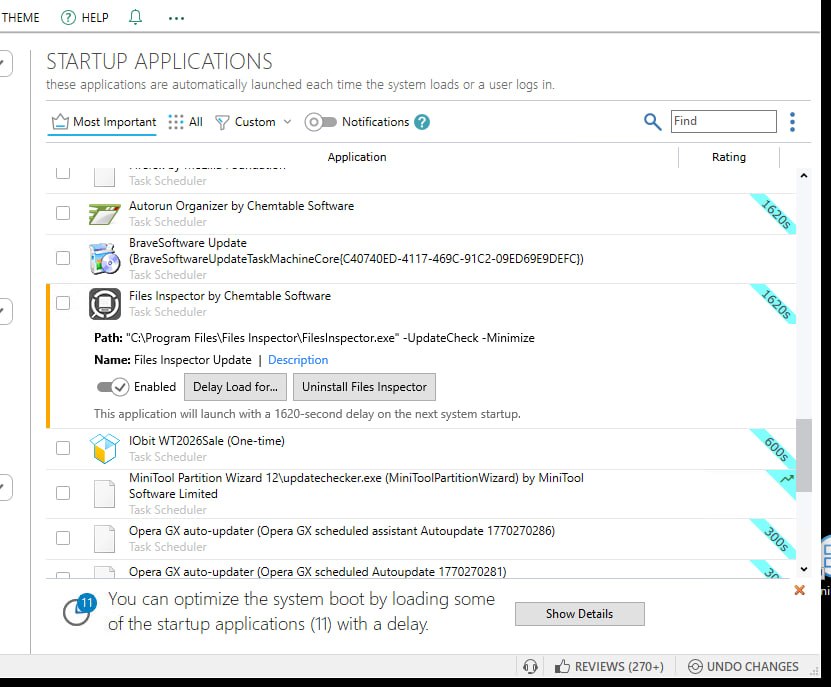
Many of you who use Reg Organizer have probably noticed that we’ve been steadily updating the program’s appearance for quite some time. Not so long ago, we redesigned the interface of the Programs tool — the uninstaller that many of you actively use. This fresh approach was well received by our users: it became more modern, logical, and comfortable. And we decided it was time to give the Startup Manager the same treatment — it’s one of the most requested tools, after all, since it helps you speed up system boot and get rid of resource-heavy applications that launch together with Windows.
The new Startup Applications interface will be completely overhauled. Our goal is to make sure that when you switch between tools, you never get the feeling you’re working with different programs. Visually and logically, the new Startup Manager will become one cohesive whole with the uninstaller you’re already used to. This unification isn’t just a trend — it’s a thoughtful step toward making the program interface more predictable and intuitive. You’ll be able to navigate windows faster, find the settings you need, and spend less time managing your system.
We’re not just moving buttons and panels around — we’re rethinking the entire startup management experience. Since development is still ongoing, it’s too early to reveal all the technical details or show final screenshots — some elements are still being polished, tested, and fine-tuned. But we can already say that managing startup items will become noticeably more convenient. For instance, we’ve reconsidered the placement of panels and buttons to keep the most frequently used actions within easy reach. And the ability to save display settings will let you customize the program list to your liking without having to set it up again after every restart.
It’s very important to us that the program you use to take care of your system is itself a model of neatness, modernity, and convenience. Reg Organizer evolves alongside Windows, and we strive to make every new version give you just a little more control over your operating system.
Stay tuned for updates: the new Startup Manager will be arriving in the fresh version of Reg Organizer very soon. We hope you’ll like it as much as we’re enjoying creating it.
