Now uninstallation sees drivers: New algorithms for leftovers search
2026-06-09 (updated 5 days ago) by Chemtable Software
One common problem when uninstalling programs, especially complex software (device drivers, system utilities, emulators), is drivers that remain after the uninstallation. They may have no obvious connection to the main application by name or manufacturer, and traditional cleanup tools simply don’t see them.
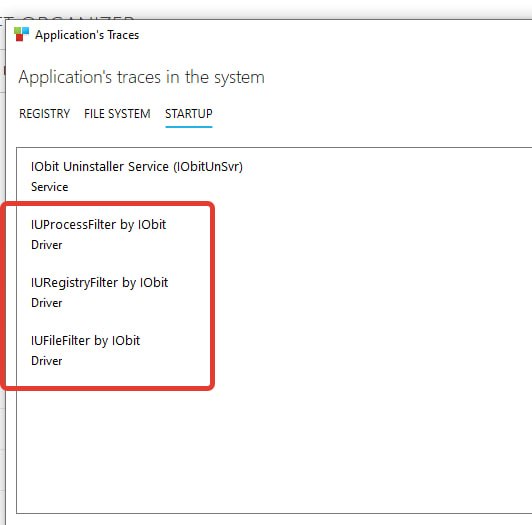
In the latest test builds of Reg Organizer, we have implemented new analysis algorithms. Now, when scanning the system for traces of uninstalled programs, the utility is able to identify drivers that were installed together with the application. They will no longer remain “invisible.”
What does this mean in practice? When uninstalling a program using the leftover search feature in Reg Organizer, it will be able to suggest removing the corresponding drivers as well, even if their names do not directly match the name of the parent software. Previously, such objects had to be cleaned manually or left to linger in the system.
The feature is currently undergoing final testing. In one of the upcoming public updates, Reg Organizer users will see it in action. This is another step toward truly complete uninstallation — without “tails” in the form of stray drivers that could affect stability or simply accumulate in the system.
